 EN
EN
 English
  简体中文
简体中文  Italian
  Spanish
  Turkish
  Japanese
  Portuguese
  Russian
  French
  German
  Polish
  Persian
  Arabic
 News
Latest news, updates & insights from Fushi.
Latest news, updates & insights from Fushi.
Oct 16, 2026Source:Intelligent Browse: 3
UHF RFID tablets can help industrial teams verify tools, track tagged equipment, and simplify routine asset audits without scanning every item individually. This article explains how to build a practical verification workflow and how the RT-10MG rugged tablet can support RFID-based equipment management in factories, warehouses, and maintenance departments.
In factories and maintenance facilities, tools and equipment often move between workstations, storage cabinets, production lines, and service areas. When these movements are recorded manually, inventory records can quickly become outdated. Employees may spend valuable time searching for missing tools, checking paper registers, or confirming whether equipment has been returned after a job.
Barcode systems improve identification, but each item generally needs to be presented to the scanner individually. This can become time-consuming when a team needs to verify a large number of tools or inspect several storage locations during one shift.
Ultra-high-frequency radio frequency identification (UHF RFID) provides another approach. A compatible RFID reader communicates wirelessly with tagged items, allowing operators to identify multiple tags within its effective reading area. Actual performance depends on tag type, reader configuration, antenna orientation, item material, and the surrounding environment.
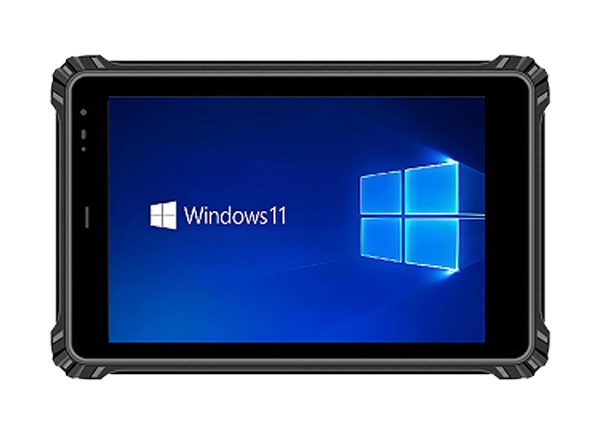
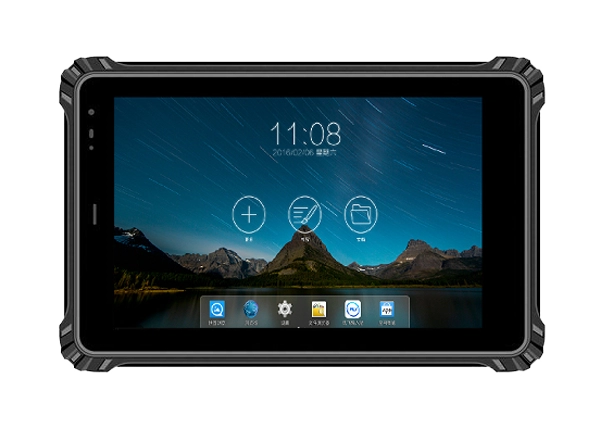
For maintenance teams that regularly handle many tagged assets, the RT-10MG 10-inch Android13 Rugged Tablet offers a mobile computing platform with optional embedded UHF RFID reader configurations. When integrated with suitable inventory software, it can support a more organized process for checking tools, recording discrepancies, and updating asset records.
A typical RFID asset verification process starts by attaching a compatible tag to each tool or piece of equipment. The tag contains an identifier that the inventory application associates with an asset record, such as a tool number, description, department, storage location, or maintenance status.
During an audit, an employee opens the relevant inventory list and uses the RFID-enabled tablet to read tags in the designated area. The application compares detected identifiers with the expected asset records and presents the results for review.
For example, a maintenance workshop might verify the tools assigned to a particular cabinet before the next shift. Instead of checking every item against a printed list, an employee can use RFID readings to identify the tagged tools detected within the reading area. The software can then flag items that appear to be missing or require further confirmation.
The same process can support equipment handovers, periodic audits, and checks of shared tools. However, a tag reading alone does not prove that an item is in the correct location or has been returned to the correct person. The workflow should account for nearby tags, duplicate readings, and items that may be outside the intended reading zone.
A reliable implementation combines RFID identification with clear location records, user procedures, and exception handling.
The RFID reader is one of the most important considerations when selecting a tablet for industrial asset verification. A longer nominal reading distance is not automatically better for every application.
The RT-10MG rugged tablet lists two embedded UHF module options: PR9200 and R2000. According to the supplied product specifications, the PR9200 configuration has a stated reading distance of approximately 3–5 meters, while the R2000 configuration is listed at approximately 10–15 meters.
These figures are reference specifications, not guaranteed results in every working environment. Actual read distance can change with tag design, reader settings, antenna performance, metal surfaces, interference, and local radio regulations.
For a tool cabinet or a compact maintenance room, a shorter reading range may be useful because it can help limit unwanted reads from nearby assets. For a larger storage area, a longer-range configuration may reduce the need to move as close to each group of tagged items.
Before selecting a module, buyers should consider four questions:
l How far away will the employee normally be from the tagged equipment?
l Are the tools made of metal or stored close to metal shelves and machinery?
l Does the application need to read a group of items or identify one specific asset?
l Can the selected reader work reliably with the tags already used by the organization?
Metal tools may require tags specifically designed for metal surfaces. Testing representative items before deployment is therefore more useful than relying on a reading-distance figure alone.
A successful RFID project needs a repeatable operating procedure. The following workflow provides a starting point for maintenance departments, equipment rooms, and industrial warehouses.
1. Register each asset
Create a record for every tool or piece of equipment. Include a unique asset identifier, description, assigned location, and any other information required by the maintenance process. Attach a compatible RFID tag and associate its identifier with the correct record.
2. Define verification areas
Divide the facility into manageable zones, such as tool cabinets, maintenance benches, production cells, and spare-parts storage areas. Employees should know which assets belong to each zone before scanning begins.
3. Read tags and compare results
Use the tablet and compatible RFID application to collect tag identifiers. The application should compare the detected items against the expected list and distinguish confirmed matches from missing or unexpected records.
4. Investigate discrepancies
If an item is not detected, check whether it has been moved, is outside the reading area, or has a damaged or unsuitable tag. If an unexpected tag appears, confirm whether it belongs to a nearby zone. Do not automatically classify every unread item as lost.
5. Save the audit record
Record the verification time, responsible employee, location, and any follow-up action. Where required, synchronize the results with the organization's asset management or enterprise system.
The RT-10MG Android tablet can serve as the mobile interface for this process, provided the chosen application supports the selected UHF module and the required inventory functions. Features such as exception reports, audit history, and database synchronization depend on the software implementation rather than the tablet alone.
Industrial tools are not always stored in clean office environments. Employees may carry out audits near production equipment, in dusty workshops, in outdoor storage areas, or in locations where moisture and temperature changes are common.
The RT-10MG specifies IP67 protection and an operating temperature range of -20°C to 60°C. Its stated drop resistance is 1.2 meters onto a composite wooden floor under the specified test conditions. These characteristics can be useful when evaluating a tablet for mobile work in demanding environments.
IP67 indicates dust protection and protection against temporary immersion in water under defined test conditions. It does not guarantee resistance to every chemical, impact, or industrial hazard. Organizations should confirm that the device's documented protection level matches their actual workplace conditions.
The tablet also features a 10-inch LCD display, with listed resolution options of 800 × 1280 and 1200 × 1920. Brightness options include 500, 800, and 1000 nits. The larger screen can provide room for asset lists, equipment details, and discrepancy reports, while the selected brightness should be evaluated under the lighting conditions in which employees will work.
Its 10-point capacitive touchscreen has a stated surface hardness of 7H, with customizable anti-glare, glove-touch, and wet-hand-touch options. These options may be relevant for employees who operate the device while wearing protective gloves, but the required touch configuration should be confirmed before ordering.
A tool verification process can lose efficiency if the tablet needs frequent charging or cannot synchronize records when required. The RT-10MG is specified with a built-in 3.8V, 10,000mAh polymer lithium-ion battery. The stated battery life is approximately 10 hours when playing local 1080p high-definition video at 50% volume.
That video test is not equivalent to continuous RFID operation. Reader activity, screen brightness, wireless connections, and application workload can all affect real-world battery endurance. A pilot test using the intended UHF module and inventory application can establish whether the device will last through a typical shift.
For connectivity, the tablet supports Wi-Fi 802.11a/b/g/n/ac, Bluetooth 5.3, and listed 2G/3G/4G cellular bands. The available connection method should be selected according to site coverage and the inventory system's requirements. The supplied specifications do not establish 5G support, so this should be verified separately if it is a purchasing requirement.
If wireless coverage is unreliable, the inventory application may need to store audit results locally and synchronize them later. This capability must be provided by the software and tested before deployment.
RFID readings become more valuable when they update the records that employees already use. Depending on the organization's systems, this may involve a warehouse management system, enterprise resource planning platform, maintenance management application, or custom asset database.
Before purchasing a tablet configuration, confirm that the UHF reader provides a compatible software development kit or interface for the intended Android application. Check whether the software can filter duplicate reads, associate tags with asset records, retain audit history, and handle failed synchronization.
The RT-10MG runs Android 13 and is offered with 4GB RAM and 64GB storage or 8GB RAM and 128GB storage. The appropriate configuration depends on the application, the amount of local data, and whether other business applications will run on the device. These specifications alone do not guarantee compatibility with a particular RFID software package.
Fushizk Technology Co., Ltd. develops rugged computing tablets and identifies embedded system development, AI algorithm optimization, and wireless communication technology as its core technical areas. For an industrial RFID deployment, buyers should discuss the required reader module, Android software compatibility, tag selection, and system integration before finalizing the hardware configuration.
A small pilot can help determine whether an RFID tablet will work reliably with the tools and equipment in a real facility. Start with a representative group of tagged assets, including metal tools and items stored close together.
Test the reader at different distances and orientations. Check whether nearby tags are detected unintentionally and whether the application can distinguish assets assigned to different storage zones. Repeat the test during normal operations, when machinery, personnel, and other objects may affect the reading environment.
Next, evaluate the full audit workflow. Confirm that employees can review missing items, correct location records, save results, and synchronize data without creating duplicate asset entries. Measure battery consumption over a representative shift and assess screen readability under actual workplace lighting.
Finally, document the chosen reader configuration, compatible tag types, application version, and operating procedures. These details will make future troubleshooting and expansion easier.
UHF RFID tablets can simplify industrial tool verification by reducing repetitive individual scans and helping teams compare detected assets with inventory records. Their effectiveness depends on more than reading distance: compatible tags, suitable reader configuration, reliable software, and a clear verification process are all essential.
With optional PR9200 and R2000 UHF reader configurations, IP67 protection, an Android 13 platform, and a 10-inch display, the RT-10MG is a candidate for industrial tool and equipment tracking projects. Testing the complete setup with real assets before deployment will help businesses choose the appropriate configuration and establish a dependable audit workflow.