 EN
 English
 简体中文
 Italian
 Spanish
 Turkish
 Japanese
 Portuguese
 Russian
 French
 German
 Polish
 Persian
 Arabic
News
Latest news, updates & insights from Fushi.
Latest news, updates & insights from Fushi.
Oct 28, 2026Source:Intelligent Browse: 4
A sunlight-readable rugged tablet helps inspection teams access equipment records, maintenance instructions, and digital forms in outdoor working environments. When technicians work under direct sunlight, beside production equipment, or across exposed industrial sites, screen visibility directly affects how quickly they can read information and complete field tasks.
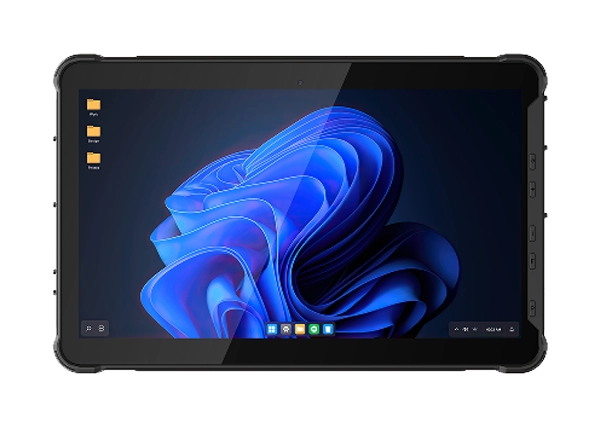
The RT-10C 10.1-inch Windows 10/11 rugged tablet offers three display configurations that combine different brightness and resolution levels. These options allow businesses to select a screen according to their lighting conditions, application requirements, and data-display needs. With IP67 protection, a removable battery, programmable function keys, and multiple connectivity interfaces, the RT-10C is designed for mobile industrial workflows where display usability and device protection both matter.
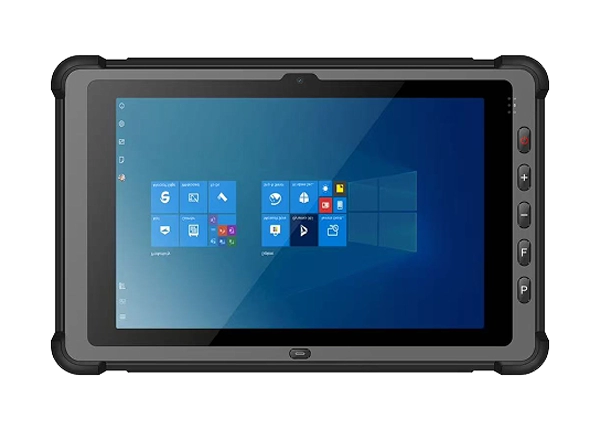
Outdoor screen readability depends on more than the brightness number printed on a specification sheet. Display brightness, contrast, surface reflection, viewing angle, and software interface design all influence how easily workers can read information in changing lighting conditions.
Brightness is commonly measured in candelas per square meter (cd/m²), also known as nits. A higher brightness rating can make screen content easier to see in bright surroundings, particularly when a device is used in an exposed area.
For a rugged tablet used in outdoor inspection, brightness should be evaluated alongside contrast and screen reflection. A high-brightness panel can improve visibility, but reflections from direct sunlight or nearby surfaces may still affect the viewing experience.
The RT-10C provides a standard display brightness of 450 cd/m², with optional configurations rated at 800 cd/m² or 1,000 cd/m². The 1,000 cd/m² option uses an 800 × 1280 resolution panel, while the 800 cd/m² option is paired with a 1200 × 1920 panel.
The device also lists optional AG+AF and AR coating configurations. These surface treatments can be considered when selecting a display for environments where reflections, fingerprints, and frequent screen interaction are relevant.
Resolution determines how much visual information a screen can display, while brightness influences how clearly that information can be seen under strong ambient light.
A higher-resolution panel can provide more detail for technical drawings, dense forms, and complex application interfaces. However, increasing resolution does not automatically make a screen easier to read in direct sunlight.
For outdoor inspection, buyers should evaluate both specifications together. A 1,000 cd/m² panel may be more suitable for bright outdoor environments, while a 1200 × 1920 panel may be more appropriate for users who frequently review detailed diagrams or information-rich documents.
The RT-10C supports three display configurations that combine brightness and resolution in different ways.
Configuration | Resolution | Brightness | Typical Application |
Standard | 800 × 1280 | 450 cd/m² | Indoor inspection and moderate outdoor lighting |
High-brightness | 800 × 1280 | 1,000 cd/m² | Outdoor patrol and bright working environments |
High-resolution | 1200 × 1920 | 800 cd/m² | Technical drawings, detailed forms, and information-dense interfaces |
The standard 800 × 1280 configuration provides a practical display for routine inspection applications, equipment records, and digital checklists. It is suitable for teams that primarily work indoors or in locations with moderate ambient light.
The 1,000 cd/m² configuration maintains the same 800 × 1280 resolution while increasing screen brightness. This option is worth evaluating for outdoor patrols, utility inspections, and maintenance work performed in exposed areas.
The 1200 × 1920 configuration combines higher resolution with 800 cd/m² brightness. It can provide additional detail when technicians need to review technical drawings, detailed equipment information, or complex inspection forms.
These configurations should be selected according to the intended application rather than assuming that the highest brightness or resolution is automatically the best choice.
A 10.1-inch rugged tablet provides a larger working area than a typical handheld mobile device while remaining portable enough for mobile inspection tasks.
For technicians reviewing equipment labels, checking maintenance instructions, or completing inspection forms, the display should present information clearly without requiring excessive zooming or scrolling.
The 800 × 1280 display supports common Windows-based mobile workflows, including equipment records, inspection checklists, and data-entry applications.
The optional 1200 × 1920 configuration provides more pixels for detailed visual content. This can be useful when users need to review engineering drawings, read dense tables, or view multiple information fields within the same application.
However, software scaling is important. A high-resolution screen does not automatically improve usability if application text and interface elements become too small. Businesses should test the actual software on the intended display configuration before deployment.
For routine inspection tasks, the standard or high-brightness 800 × 1280 version may provide a suitable balance between readability and application compatibility. For detailed technical work, the 1200 × 1920 option offers a higher-resolution alternative.
A rugged tablet used in industrial environments must support reliable interaction as well as screen visibility. Inspection personnel may need to operate the device while wearing work gloves, handling tools, or working in damp conditions.
The RT-10C uses a GT9110 capacitive touch panel. Its listed touch configuration supports five-point touch, with up to ten-point touch capability. Optional features include wet-hand touch, glove touch, and active or passive capacitive pen support.
These touch options are particularly relevant for teams that work outdoors or handle equipment throughout the day. A glove-compatible touchscreen can reduce the need to remove protective gloves whenever workers enter information or navigate an application.
Before choosing an optional touch configuration, test the device with the actual gloves used by the team. Different glove materials and thicknesses can affect capacitive touch response.
The RT-10C includes two self-defined buttons identified as P-Key and F-Key. These programmable keys can be configured for frequently used functions according to the device's supported software and customization options.
For inspection personnel, physical keys can provide convenient access to common operations without relying entirely on touchscreen navigation. Depending on the configured workflow, a key may be assigned to launch an application, activate a function, or trigger a frequently used operation.
This is particularly useful when workers need to operate the tablet quickly or when touchscreen interaction is less convenient.
The RT-10C lists third-generation Corning Gorilla Glass with a G+G structure and 7H hardness. These specifications are relevant when evaluating screen durability in environments where the device is frequently handled or transported.
Optional AG+AF and AR coatings are also listed in the display specification.
Glass hardness and surface coatings should not be interpreted as protection against every type of impact, abrasion, or misuse. Proper handling, suitable mounting, and regular equipment inspection remain important parts of field-device management.
Outdoor inspection equipment may be exposed to dust, rain, splashes, accidental drops, and changing temperatures. A sunlight-readable rugged tablet therefore needs suitable enclosure protection as well as an appropriate display.
The RT-10C is specified with IP67 protection. Under the applicable enclosure test conditions, IP67 indicates dust-tight protection and resistance to temporary water immersion.
This rating does not establish resistance to every industrial liquid, chemical, or high-pressure cleaning method. Protective covers and connectors should be maintained according to the manufacturer's handling instructions.
The RT-10C also lists a 1.2-meter drop test on a cement floor. This provides a defined reference for evaluating the device's drop resistance under the stated test conditions.
Reliability Item | RT-10C Specification |
IP protection | IP67 |
Drop test | 1.2 m, cement floor |
Operating temperature | -25°C to 60°C |
Storage temperature | -30°C to 70°C |
For outdoor use, operating temperature is particularly important. The specified range of -25°C to 60°C covers a broad range of working conditions, although direct sunlight can increase the actual device temperature beyond the surrounding air temperature.
Workers should follow the device's operating guidance and avoid exposing it to conditions outside the specified limits.
Battery endurance is an important consideration for a rugged tablet used across multiple inspection locations. Workers may need to access digital records, use GPS, capture photographs, and synchronize information without returning to a charging station.
The RT-10C uses a removable 7.6V, 10,000mAh lithium-ion battery. Its listed endurance is 12 hours under the specified 1080P video playback condition with LCD brightness set to 50%.
This figure is a manufacturer-stated playback condition, not a guaranteed runtime for every inspection workload. Actual operating time can vary with screen brightness, application activity, wireless communication, GPS use, camera operation, and other power-consuming functions.
Power Item | Specification |
Battery capacity | 10,000mAh |
Battery voltage | 7.6V |
Battery type | Lithium-ion |
Battery design | Removable |
Listed endurance | 12 hours |
Test condition | 1080P video playback, LCD brightness 50% |
For a full-shift deployment, businesses should evaluate the device under representative workloads. A practical test can include the inspection application, expected screen brightness, wireless connection, GPS activity, and camera usage.
The removable battery design also allows teams to consider spare batteries as part of their power-management plan. A standby battery is listed as an optional accessory.
Specification | Standard | Option |
Model | RT-10C | — |
Display size | 10.1-inch IPS LCD | — |
Standard resolution | 800 × 1280 | 1200 × 1920 |
Standard brightness | 450 cd/m² | 800 cd/m² or 1,000 cd/m², according to display configuration |
CPU | Intel Core i5-1235U / i7-1255U | — |
RAM | 16GB | 32GB |
Storage | 128GB | 256GB, 512GB, up to 2TB |
Operating system | Windows 10 / Windows 11 | Windows Home / IoT options listed |
Touch panel | GT9110, five-point touch / up to ten-point touch | Wet-hand touch, glove touch, active/passive capacitive pen |
Glass | Corning Gorilla Glass 3, G+G, 7H hardness | AG+AF coating, AR coating |
Battery | 7.6V, 10,000mAh removable lithium-ion | Standby battery accessory |
Front camera | 5MP | — |
Rear camera | 8MP with autofocus | — |
GPS | U-Blox M7N | — |
Wi-Fi | 802.11 a/b/g/n/ac/ax, 2.4G + 5.8G dual-band | Wi-Fi 6 support |
Bluetooth | Bluetooth 5.2 BLE, Class 1, 10m transmission range | — |
4G LTE | FDD B1/B3/B5/B7/B8/B20; TDD B38/B40/B41 | — |
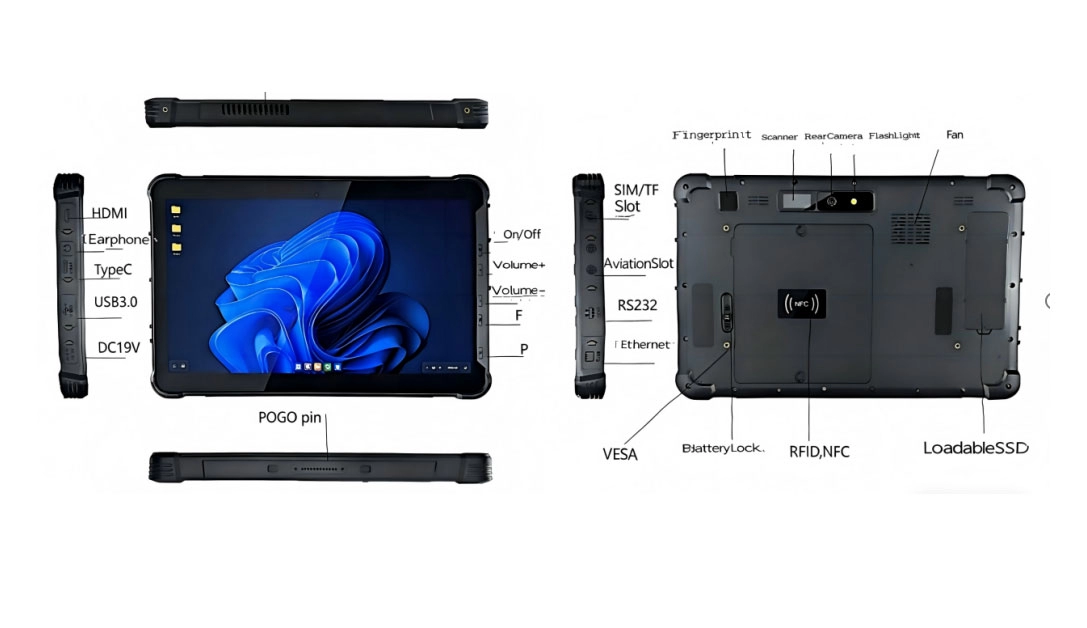
Interfaces | Type-C USB 2.0 OTG, Type-A USB 3.0, RJ45, Mini HDMI, RS232, 12-pin Pogo Pin, Micro SIM, TF slot | CONINVERS interface configuration |
IP protection | IP67 | — |
Drop test | 1.2m, cement floor | — |
Operating temperature | -25°C to 60°C | — |
Storage temperature | -30°C to 70°C | — |
Dimensions | 277.48 × 182.74 × 21.5mm | Custom color |
Before deploying a sunlight-readable rugged tablet across an inspection team, conduct an acceptance test using the actual applications and working conditions.
1. Check outdoor readability. Compare the standard, high-brightness, and high-resolution display configurations under representative lighting conditions.
2. Review application content. Open inspection forms, equipment records, drawings, and the smallest text fields used in daily work.
3. Test touchscreen operation. Evaluate common gestures and data-entry tasks with the gloves used by field personnel.
4. Check physical buttons. Verify the P-Key and F-Key configuration against the team's required workflow.
5. Review battery performance. Run representative inspection tasks and record the effect of screen brightness, GPS, wireless connections, and camera use.
6. Inspect interfaces and protection. Check the required ports, protective covers, mounting accessories, and the device's suitability for the intended environment.
The appropriate brightness depends on the lighting conditions, viewing angle, screen reflection, and software interface. The RT-10C offers a standard 450 cd/m² display, with optional 800 cd/m² and 1,000 cd/m² configurations. Teams working frequently in direct sunlight can evaluate the 1,000 cd/m² option.
Yes. The standard display resolution is 800 × 1280. An optional 1200 × 1920 configuration is also available with 800 cd/m² brightness.
Glove touch is listed as an optional touchscreen feature. The standard touch panel supports five-point touch, with up to ten-point touch capability. Buyers should specify the required touch configuration when ordering.
The RT-10C has IP67 protection, a 1.2-meter drop-test specification on a cement floor, and an operating temperature range of -25°C to 60°C. These specifications are relevant to outdoor industrial inspection, subject to the actual site conditions and device handling requirements.
The RT-10C uses a removable 7.6V, 10,000mAh lithium-ion battery. Its listed endurance is 12 hours under 1080P video playback with LCD brightness at 50%. Runtime during active inspection work varies with the workload and operating settings.
A sunlight-readable rugged tablet should combine suitable display brightness, practical resolution, responsive touch operation, and enclosure protection. Selecting a display according to the actual lighting and software requirements is more useful than choosing specifications based on a single maximum value.
The RT-10C 10.1-inch Windows 10/11 Rugged Tablet provides three display configurations, Windows 10/11 support, an optional glove-touch configuration, programmable P-Key and F-Key buttons, IP67 protection, and a removable 10,000mAh battery. These features make it a configurable platform for outdoor inspection, industrial maintenance, and other mobile field applications.
For businesses evaluating a 10.1-inch Windows rugged tablet, the RT-10C offers display and interface options that can be matched to specific inspection workflows. Contact FUSHi TECH to request the RT-10C configuration information for your application.